Detection and Classification of pieces in a real Chess Board
My Final Degree Project: training a YOLOv8 model to recognize real chess pieces and using OpenCV to recognize the position of each piece.
- #YOLOv8
- #OpenCV
- #Computer Vision
- #AI
- #Deep Learning
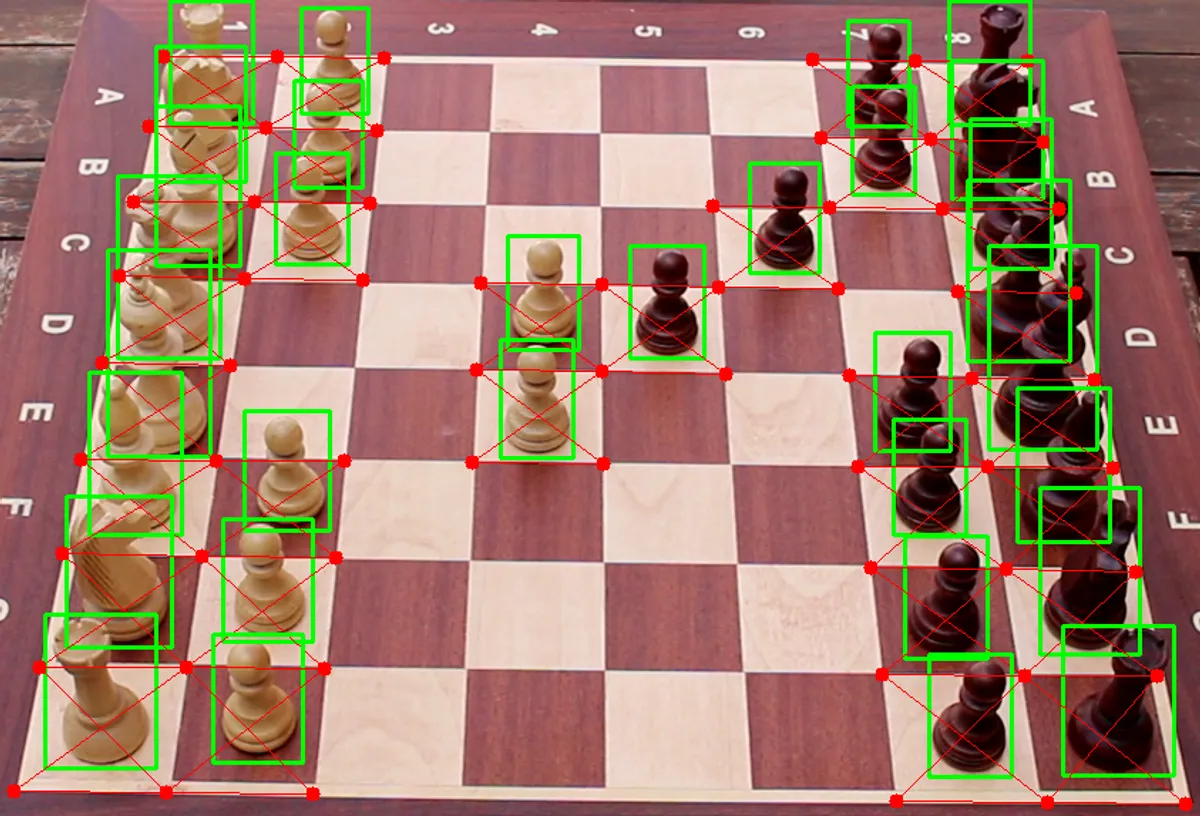
This project was done as my Final Degree Project for the University of Málaga. The purpose of this project is to develop a neural network system that detects and classifies chess pieces on a real board, outputting their positions in FEN format. It uses a custom-labeled dataset and applies deep learning and computer vision techniques to ensure accurate performance under varying lighting conditions. The system aims to help digitize physical chess games for enthusiasts.
📖 You can read my Final Degree Project paper in this Linkedin Post.
🔍 Project Overview
This project focuses on automating the recognition of chessboard positions using YOLOv8, OpenCV, and a custom dataset. The output is provided in Forsyth-Edwards Notation (FEN) for seamless import into platforms like Lichess.
- Built for chess players, streamers, and tournament digitization
- Generates both annotated images and FEN strings
- Evaluated under variable lighting and angles
🎯 Goals
🎯 General Goal
Develop software that detects and classifies chess pieces on a real board image and outputs FEN.
✅ Specific Objectives
- Create a labeled dataset from real board photos.
- Train a deep learning model to detect/classify pieces.
- Detect the board grid via computer vision techniques.
- Map pieces to cells and produce FEN.
- Evaluate accuracy under different lighting and rotations.
🛠 Technologies Used
| Category | Tools |
|---|---|
| Language | Python |
| Deep Learning | YOLOv8 (Ultralytics) |
| Data Labeling | CVAT |
| Vision Processing | OpenCV |
| Experiments | Google Colab |
| Data Analysis | Pandas, Matplotlib, SciPy |
| IDE / Tooling | Visual Studio Code, Git & GitHub |
📷 Dataset Creation
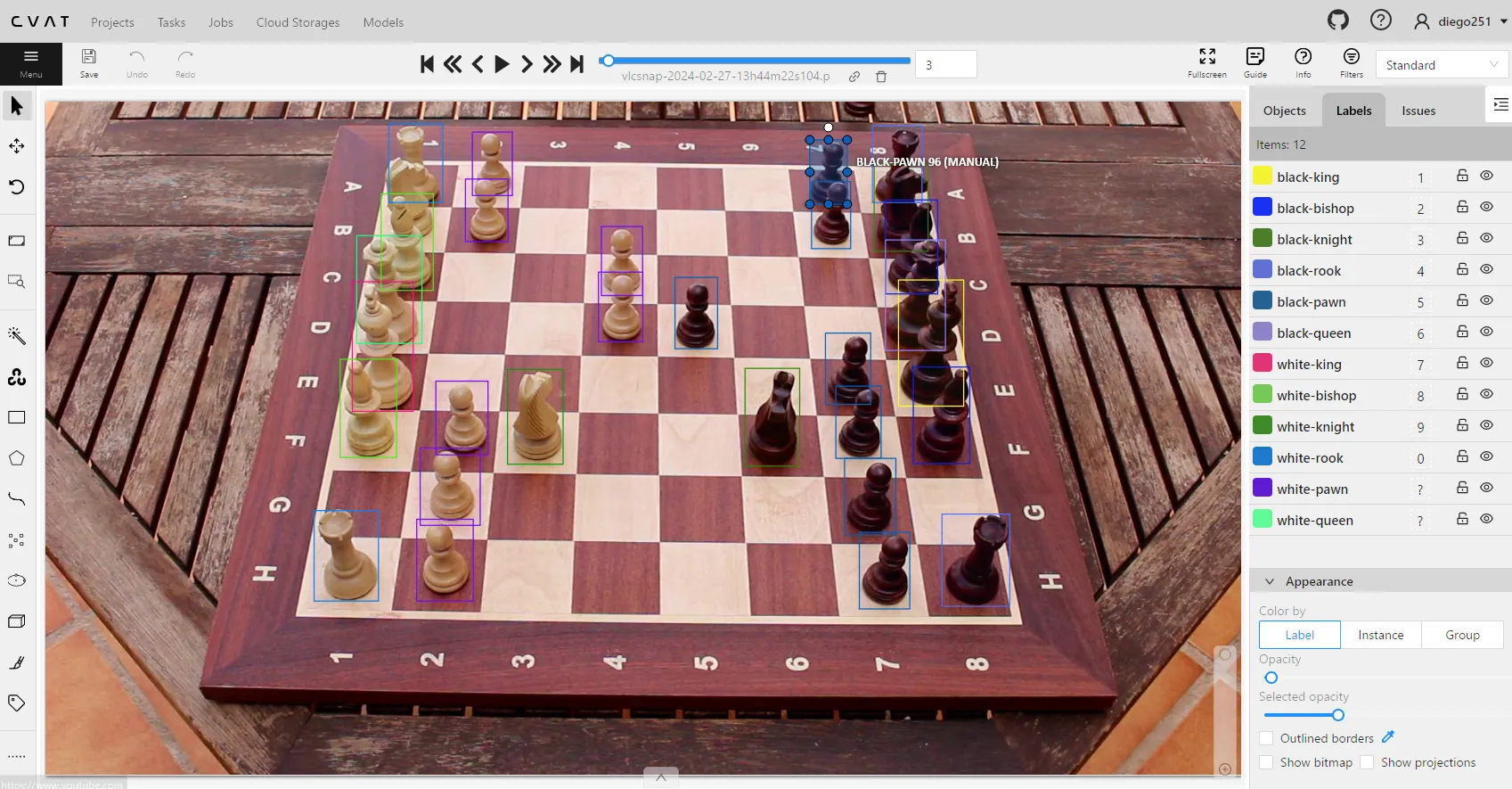
Due to the lack of publicly available datasets that suited the specific needs of my project, I decided to create my own. I used a camera to capture images of a chessboard placed in my yard, ensuring a variety of natural lighting conditions. Each image was then meticulously labeled manually, identifying every piece individually.
Dataset Features
The resulting dataset has the following characteristics:
- 130 labeled images from video frames (Canon EOS100D)
- Uniform angle (side-right view) for consistency
- Labeled using CVAT
- Distribution:
- 90 training
- 30 validation
- 10 test (never seen during training)
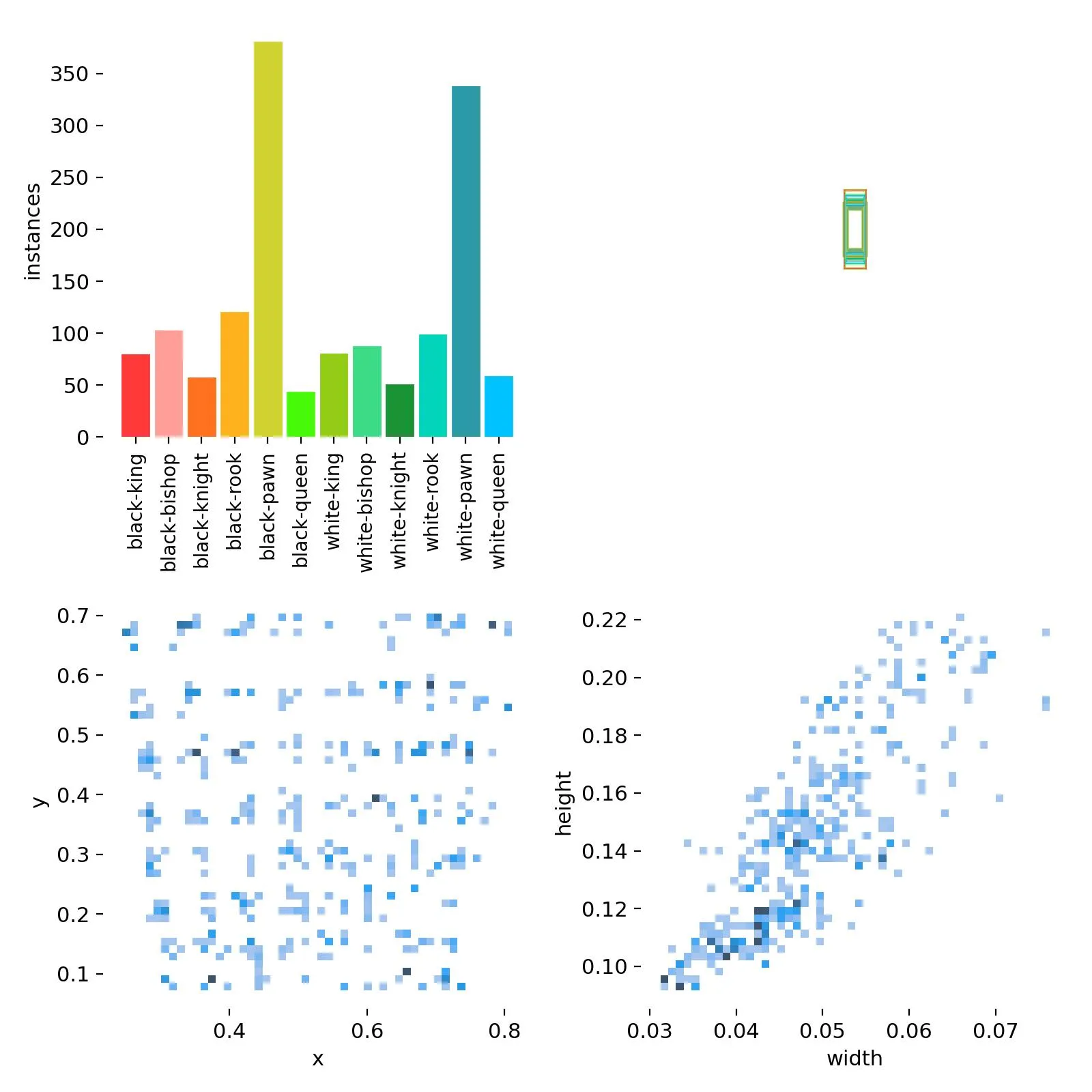
Example label:
// class_id center_x center_y width height
0 0.740893 0.358486 0.054505 0.187343
1 0.750341 0.468051 0.045786 0.155046
1 0.724542 0.215722 0.043604 0.139537
2 0.715820 0.157579 0.045057 0.129194
2 0.762695 0.564556 0.051599 0.144704
// (...)
10 0.339003 0.571662 0.050141 0.114991
Class Index Table
| Index | Class Name |
|---|---|
| 0 | black-king |
| 1 | black-bishop |
| 2 | black-knight |
| 3 | black-rook |
| 4 | black-pawn |
| 5 | black-queen |
| 6 | white-king |
| 7 | white-bishop |
| 8 | white-knight |
| 9 | white-rook |
| 10 | white-pawn |
| 11 | white-queen |
References
For dataset labeling and move selection, the following sources were referenced for notable chess positions and games:
- My 60 Memorable Games by Bobby Fischer
- Top 10 best chess games of all time!
These resources provided a diverse set of strategic examples to enhance the dataset’s variety and realism.
🧠 Piece Classification
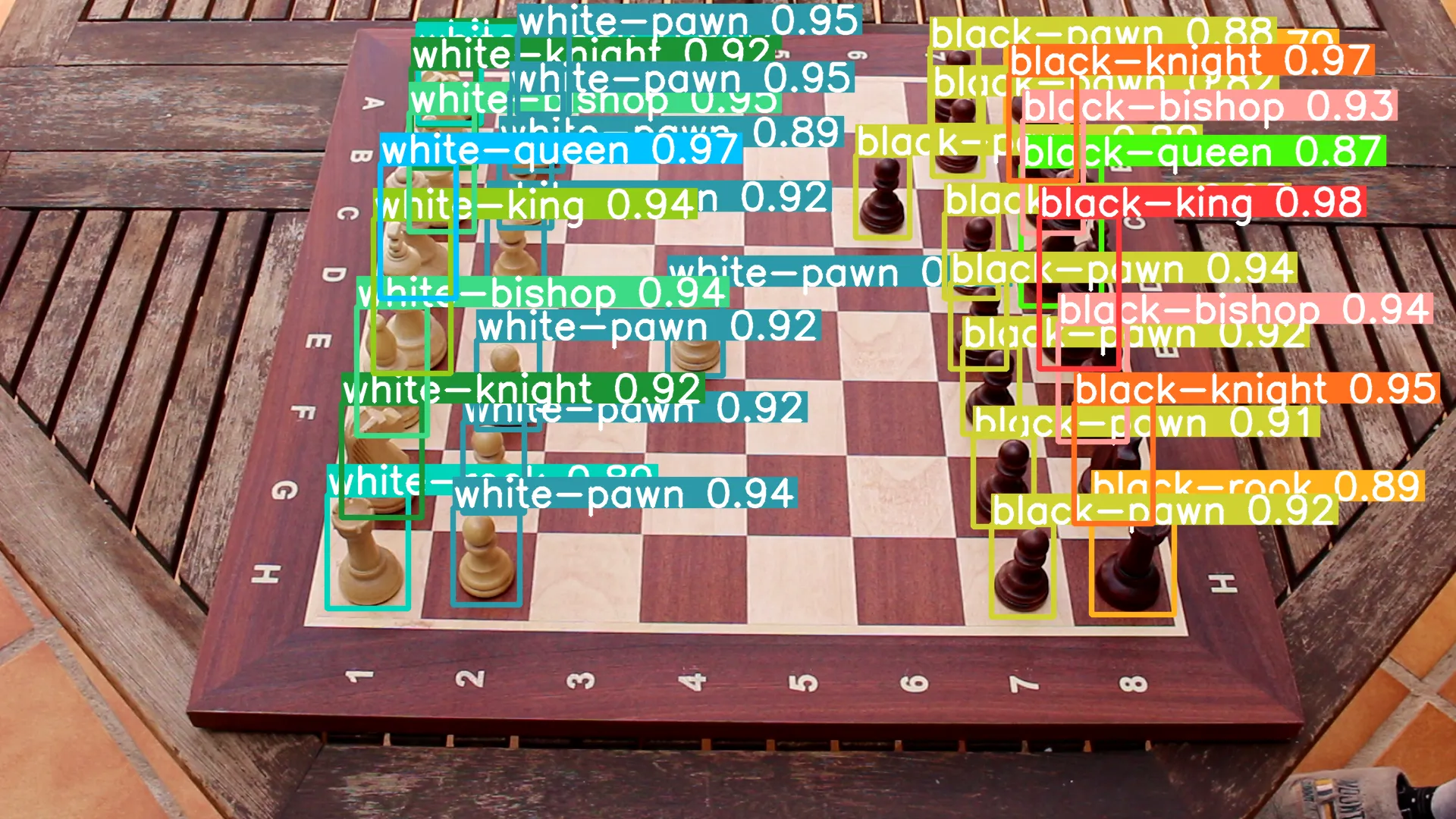
Model: YOLOv8 (via Ultralytics)
Training config:
model.train(
  data='dataset.yaml',
  epochs=30,
  batch=-1,
  lr0=0.0001,
  lrf=0.01,
  plots=True
)
Hardware: NVIDIA Tesla T4 (via Google Colab)
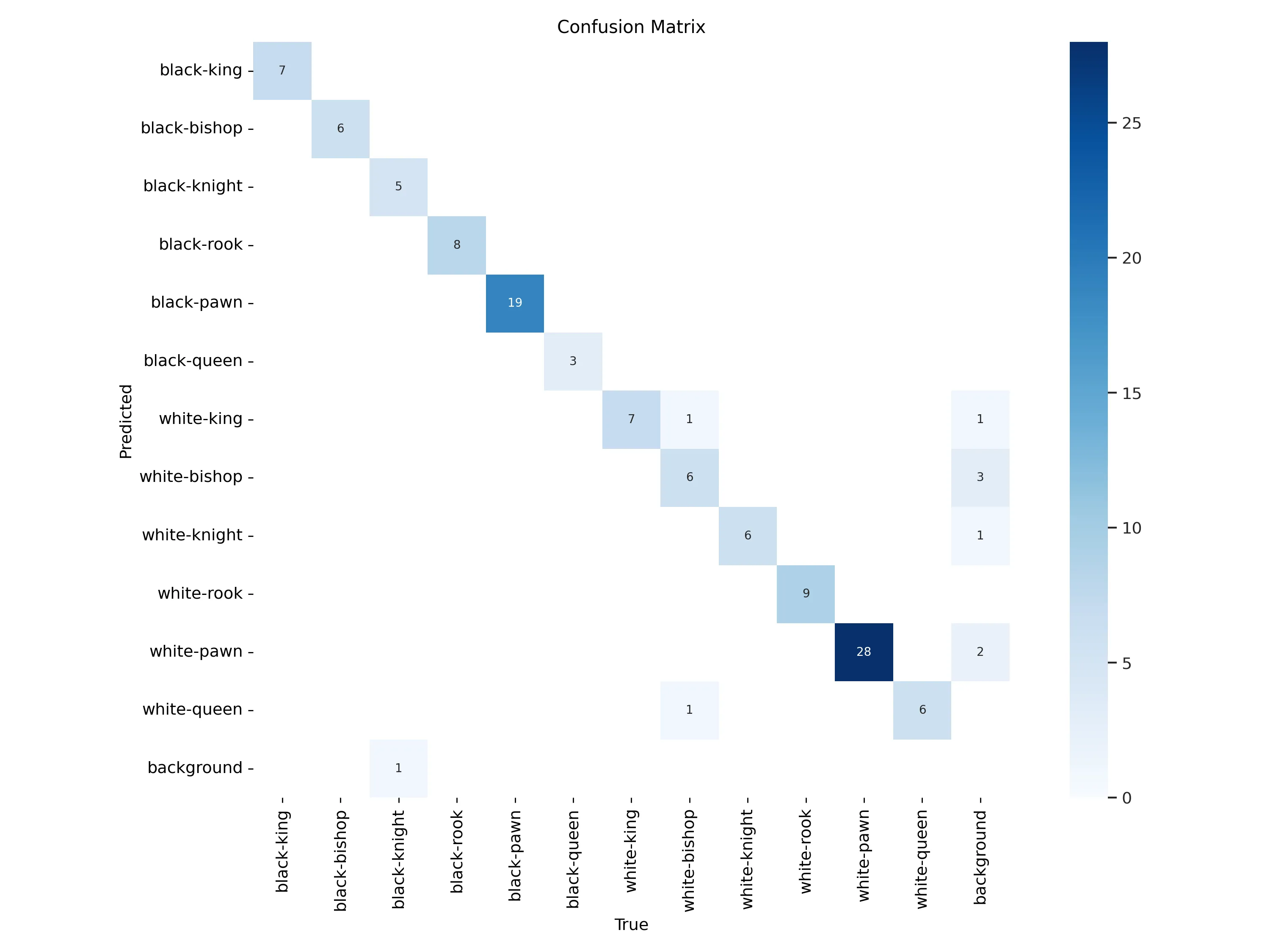
Validation: 5-fold cross-validation
📽️ Video Demostration
Chess pieces detection with #YoloV8 for my Final Degree Project: pic.twitter.com/H4aqdLVzcO
— Deinigu (@DeiniguDev) March 11, 2024
Chess pieces detection with #YoloV8 for my Final Degree Project: pic.twitter.com/H4aqdLVzcO
— Deinigu (@DeiniguDev) March 11, 2024♟️ Board Detection
Several classical algorithms were tested:
| Algorithm | Result |
|---|---|
findChessboardCorners (OpenCV) | ❌ Detected only 6x6 boards |
| Harris / Shi-Tomasi | ❌ Noise from surrounding edges |
| Canny + Hough Transform | ✅ Final choice |
✅ Final Approach
# Canny edge detection with automatic threshold
def canny_edge(img, sigma=0.33):
  v = np.median(img)
  lower = int(max(0, (1.0 - sigma) * v))
  upper = int(min(255, (1.0 + sigma) * v))
  return cv2.Canny(img, lower, upper)

# Hough line detection
cv2.HoughLines(image, 1, np.pi / 180, 125)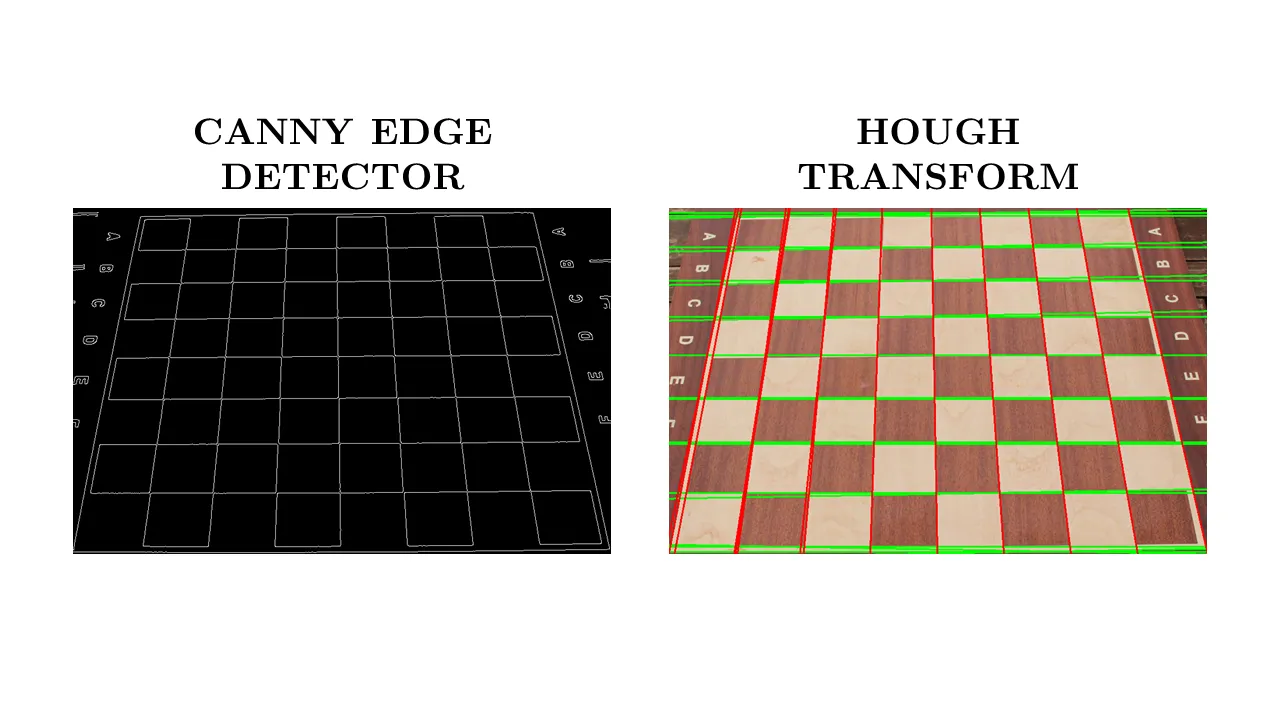
✨ Application Flow
The core of the application follows a multi-stage pipeline that combines deep learning with classical computer vision to generate an accurate digital representation of a real chessboard.
Step-by-Step Flow
-
Model Loading
- Load a pretrained YOLOv8 model (
model.pt). - If the model is not found, the system stops with a clear error message.
- Load a pretrained YOLOv8 model (
-
Image Input & Validation
- Accept a
.jpg,.jpeg, or.pngimage via CLI. - Ensure the image is tightly cropped around the board.
- Accept a
-
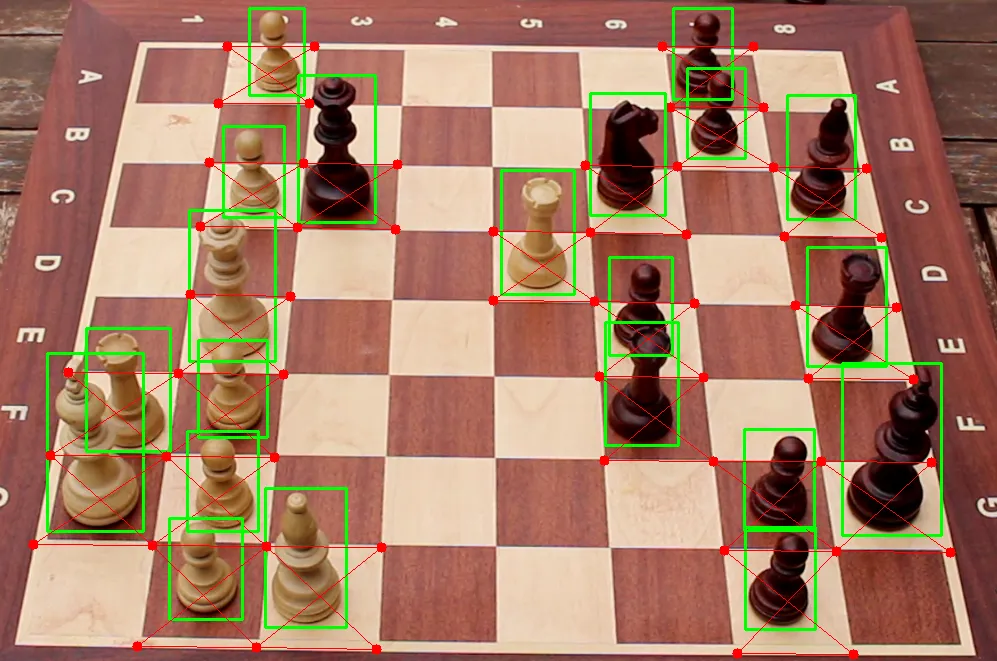
Piece Detection & Classification
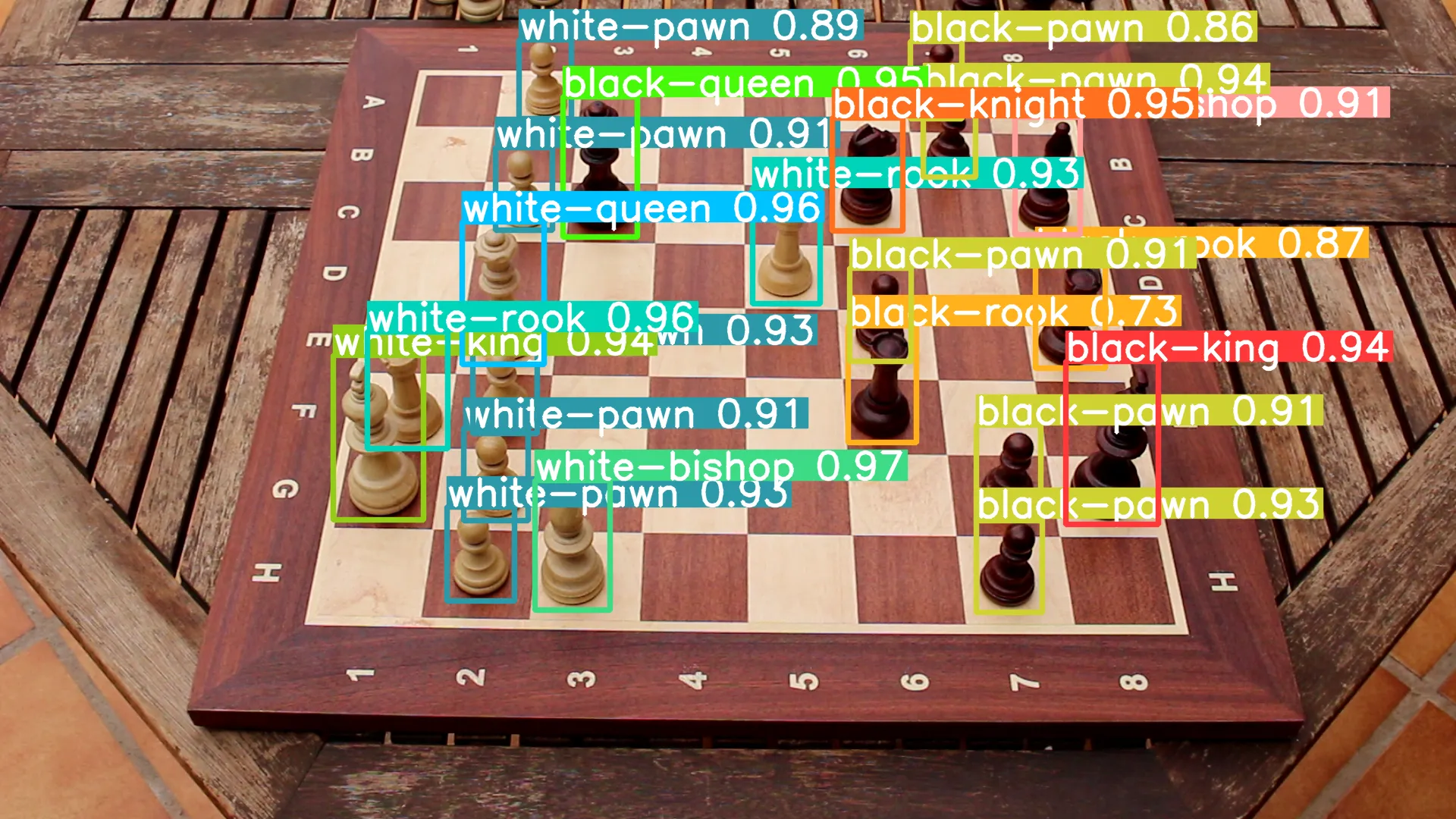
- YOLOv8 detects and classifies all pieces.
- Output saved as
labels.txtwith piece type, confidence, and bounding box info. For example:
- YOLOv8 detects and classifies all pieces.
7 0.393105 0.665913 0.0514038 0.158451
9 0.280013 0.47629 0.0551658 0.142217
11 0.345507 0.358007 0.0563328 0.174681
2 0.595982 0.213026 0.0486311 0.138532
5 0.412208 0.203345 0.0514366 0.171442
4 0.652038 0.165326 0.0362755 0.101061
0 0.76361 0.540985 0.0635183 0.19865
6 0.260062 0.534434 0.0618882 0.201384
4 0.693028 0.690002 0.0452681 0.115042
10 0.346834 0.475197 0.0442602 0.108371
10 0.330178 0.676344 0.0461226 0.11515
9 0.53991 0.299925 0.0464019 0.141713
1 0.719523 0.215075 0.0452726 0.143501
10 0.359922 0.230664 0.0392281 0.101181
4 0.60468 0.384311 0.0422276 0.113551
10 0.340781 0.578749 0.0442157 0.112926
4 0.692592 0.57734 0.0440464 0.117031
10 0.374617 0.0966979 0.0360764 0.097045
3 0.73503 0.382123 0.0478531 0.13469
4 0.643071 0.0976982 0.0354422 0.0950123
3 0.605947 0.469218 0.0467537 0.142844-
Preprocessing
-
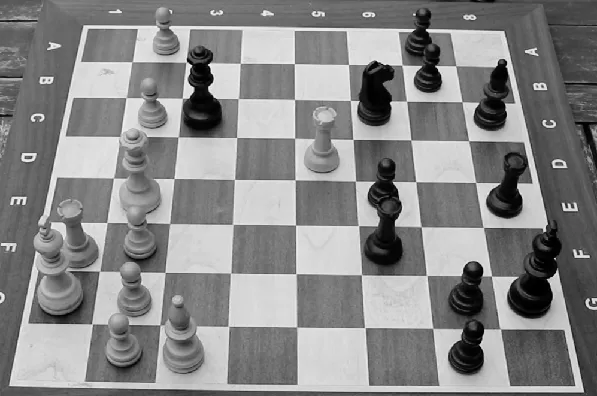
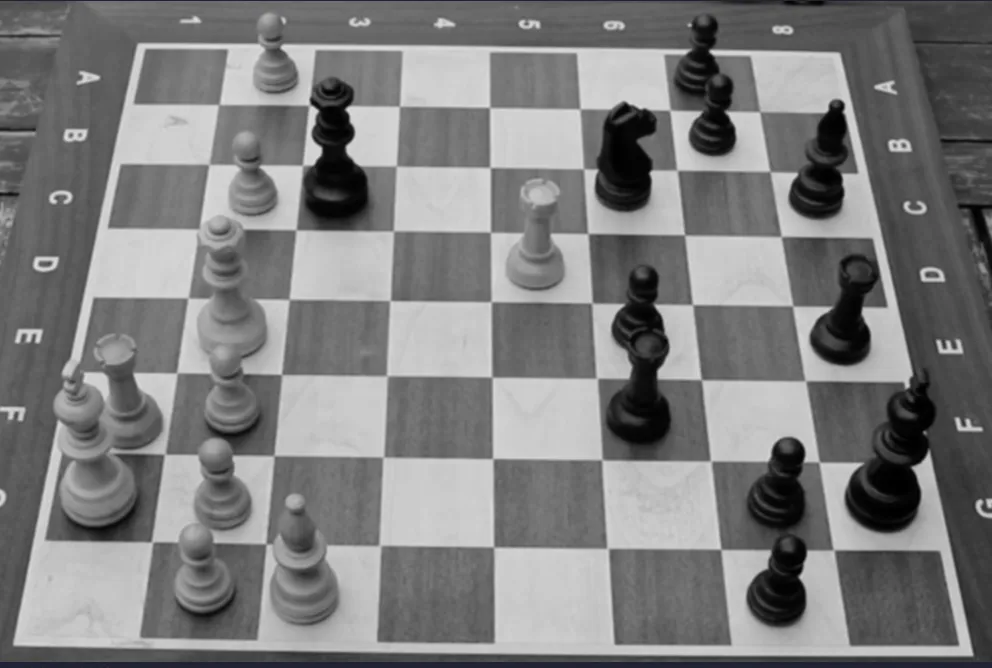
Convert image to grayscale.
-
Apply Gaussian blur to reduce noise.
-
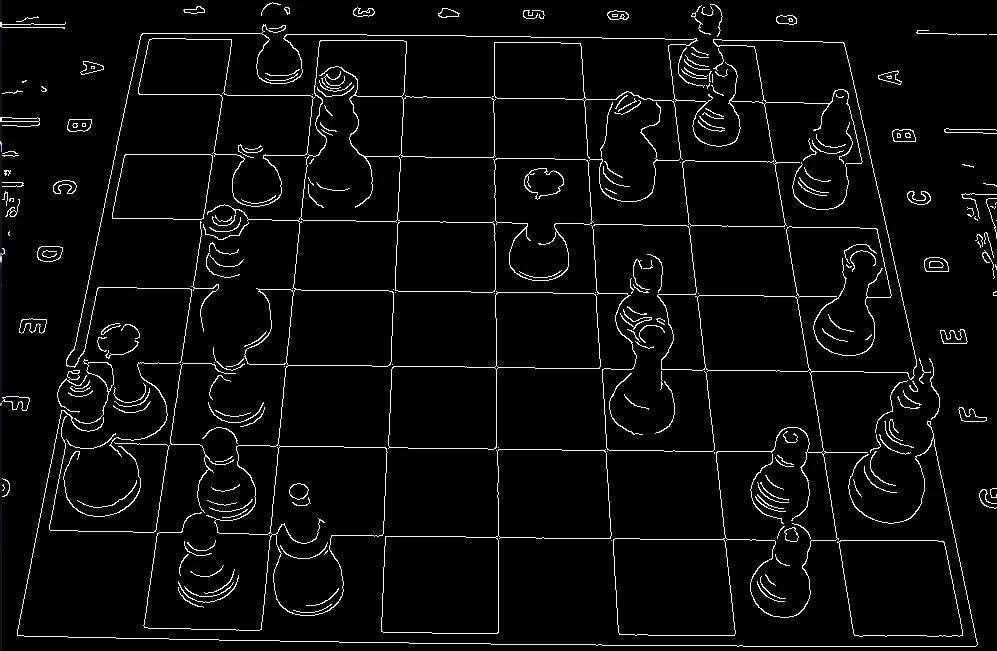
Detect edges using Canny edge detector.
-
-
Line & Corner Detection
-
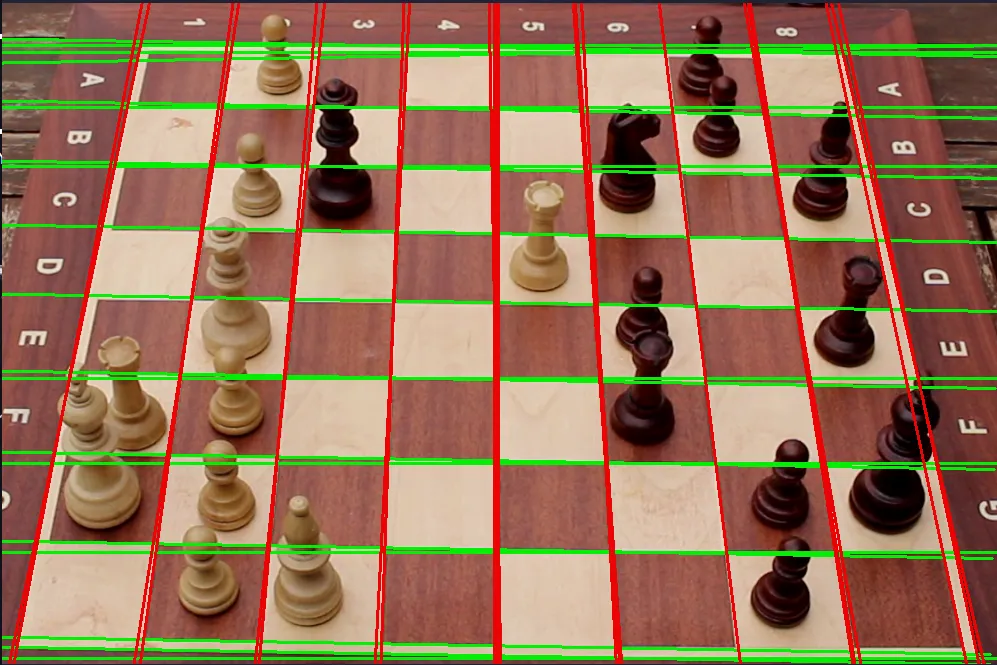
Apply Hough Line Transform to detect vertical and horizontal lines.
-
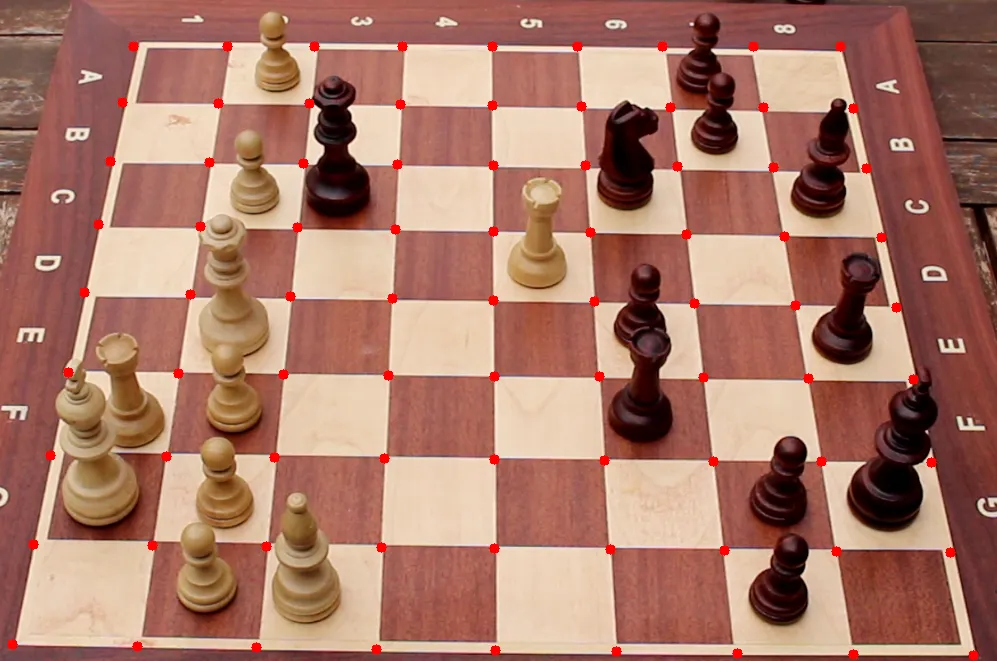
Calculate intersections = cell corners.
-
-
Cell Grid Construction
- Group intersection points to reconstruct the 8x8 chessboard grid.
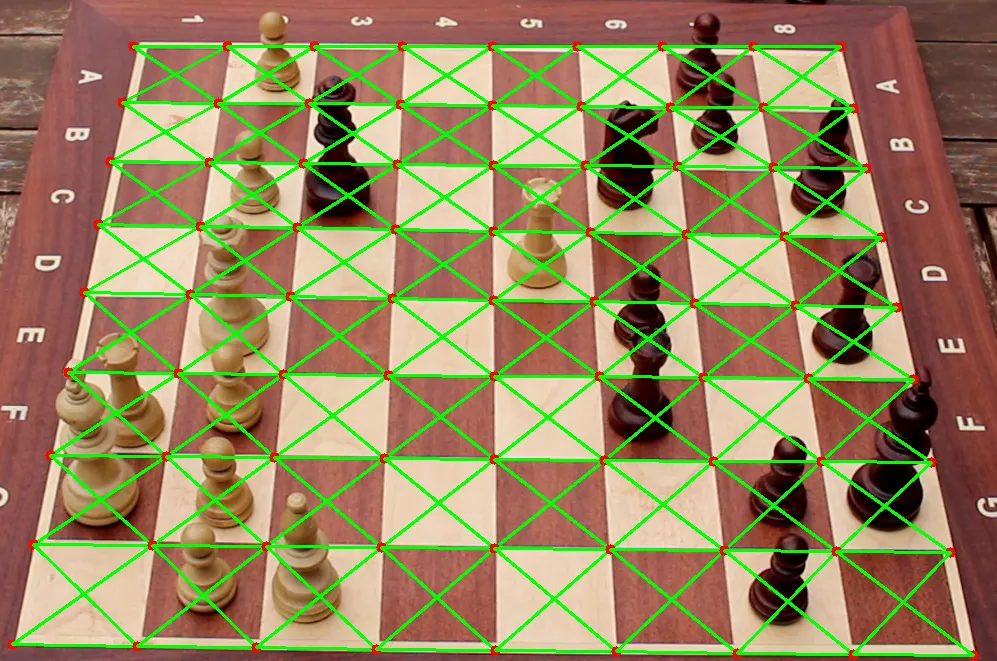
- Assign each cell a board coordinate (e.g., e4, d5).
- Group intersection points to reconstruct the 8x8 chessboard grid.
-
Piece-to-Cell Assignment
- Match detected bounding boxes to nearest cell center.
- Handle unassigned pieces using a column-shift strategy.
-
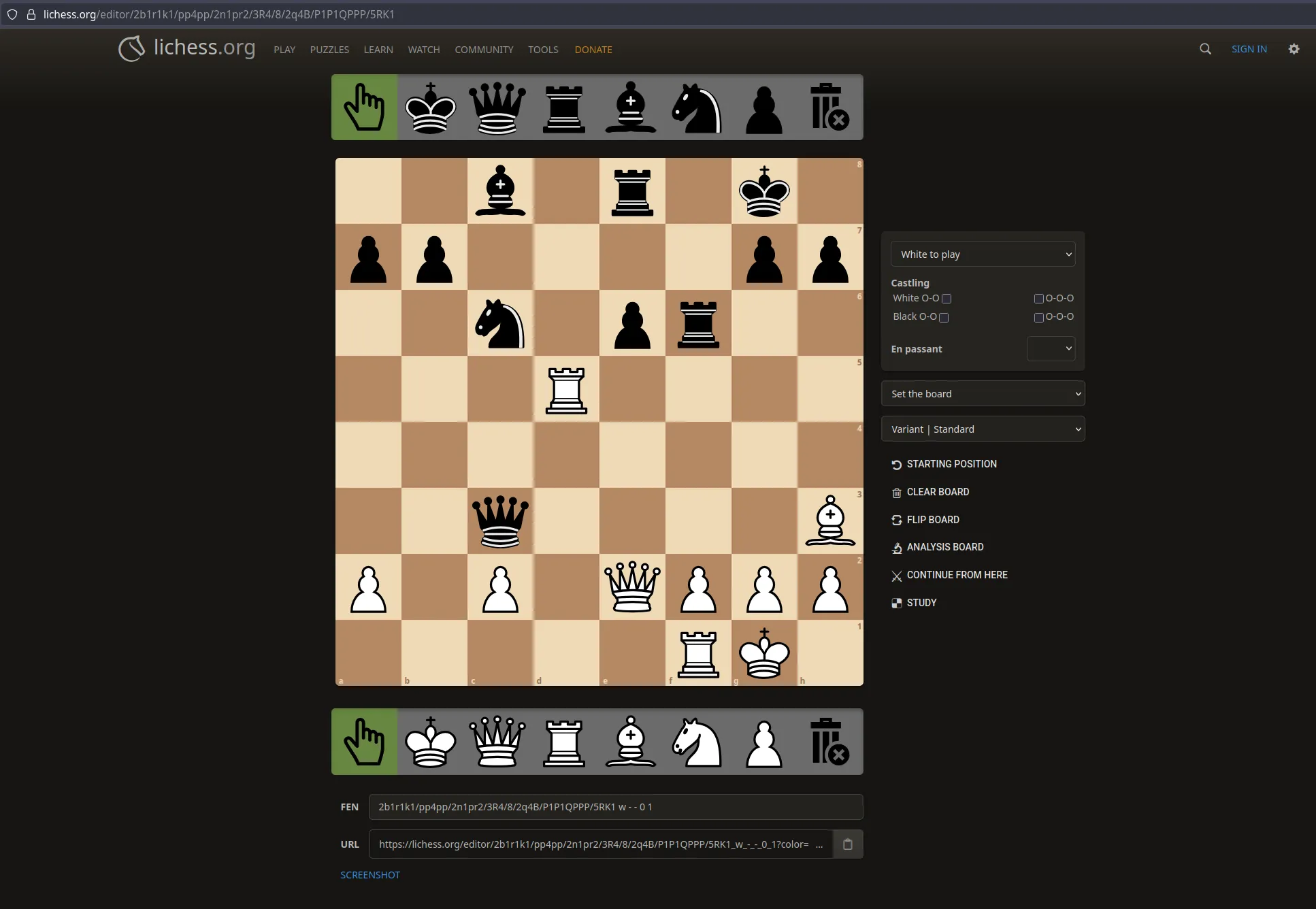
FEN Generation
- Build a FEN string from the final board state.
- Save FEN to a
.txtfile and display a Lichess URL with the position.
2b1r1k1/pp4pp/2n1pr2/3R4/8/2q4B/P1P1QPPP/5RK1 -
Annotated Output
- Generate images showing:
- Edge detection
- Grid overlay
- Final piece positions
- Save all images in a timestamped results folder.
- Generate images showing:
-
Debug Mode
- Optional flag
--debugshows intermediate images (grayscale, edges, etc.)
- Optional flag
📸 Examples
Example Console Output
❯ python main.py -i workspace/images/test4.png
Model loaded: workspace/model/model.pt

image 1/1 /home/deltablade/TFG-Diego/workspace/images/test4.png: 448x640 1 black-king, 1 black-bishop, 1 black-knight, 2 black-rooks, 5 black-pawns, 1 black-queen, 1 white-king, 1 white-bishop, 2 white-rooks, 5 white-pawns, 2 white-queens, 75.0ms
Speed: 1.1ms preprocess, 75.0ms inference, 187.6ms postprocess per image at shape (1, 3, 448, 640)
Results saved to workspace/results/2025-07-29_15-03-06_test4/predict
1 label saved to workspace/results/2025-07-29_15-03-06_test4/predict/labels
Chessboard from the perspective of the image:
▢ ♟ ▢ ▢ ▢ ▢ ♙ ▢
▢ ▢ ▢ ▢ ▢ ▢ ♙ ▢
▢ ♟ ♕ ▢ ▢ ♘ ▢ ♗
▢ ▢ ▢ ▢ ♜ ▢ ▢ ▢
▢ ♛ ▢ ▢ ▢ ♙ ▢ ♖
♜ ♟ ▢ ▢ ▢ ♖ ▢ ▢
♚ ♟ ▢ ▢ ▢ ▢ ♙ ♔
▢ ♟ ♝ ▢ ▢ ▢ ♙ ▢

Final Result:
▢ ▢ ♗ ▢ ♖ ▢ ♔ ▢
♙ ♙ ▢ ▢ ▢ ▢ ♙ ♙
▢ ▢ ♘ ▢ ♙ ♖ ▢ ▢
▢ ▢ ▢ ♜ ▢ ▢ ▢ ▢
▢ ▢ ▢ ▢ ▢ ▢ ▢ ▢
▢ ▢ ♕ ▢ ▢ ▢ ▢ ♝
♟ ▢ ♟ ▢ ♛ ♟ ♟ ♟
▢ ▢ ▢ ▢ ▢ ♜ ♚ ▢

https://lichess.org/editor/2b1r1k1/pp4pp/2n1pr2/3R4/8/2q4B/P1P1QPPP/5RK1
Example Image Output
Lichess Output
📽️ Video Demostration
Final version executed! I'm thrilled with how project turned out. ♟️ #Chess #AI #YoloV8 #OpenCV #SoftwareDevelopment https://t.co/jp0VNBykG1 pic.twitter.com/GgwBZJ79pB
— Deinigu (@DeiniguDev) August 4, 2024
⚗️ Experiments & Evaluation
Two experimental phases were conducted:
📊 Phase 1: Basic Training
- Initial training to test model and pipeline
📈 Phase 2: Cross-Validation
- 5-fold split using
.yamlconfigs - Averaged metrics for generalization score
for k in range(5):
  model.train(data=ds_yamls[k], ...)
  results[k] = model.metrics
You can find more information in the official paper.
📽️ Video Demostration
As well as that, check out this video showcasing the tests executed! pic.twitter.com/g4CeTXOUjC
— Deinigu (@DeiniguDev) August 4, 2024